Docs
Layouts and Pages
Create role-marked Pages, compose shared layouts, and connect them to routes.
A Page is the selected content for a document. A layout wraps that content with shared UI and metadata defaults. Both are ordinary render components; declare their intent with const ROLE on the render-trait implementation.
| Component | Role | Metadata lifecycle |
|---|---|---|
| Shared layout | ComponentRole::LAYOUT | Contribute defaults; render the child with metadata still open. |
| Selected Page | ComponentRole::PAGE | Finalize metadata before rendering its own body. |
| Ordinary body component | ComponentRole::COMPONENT (default) | Skip head invocation entirely. |
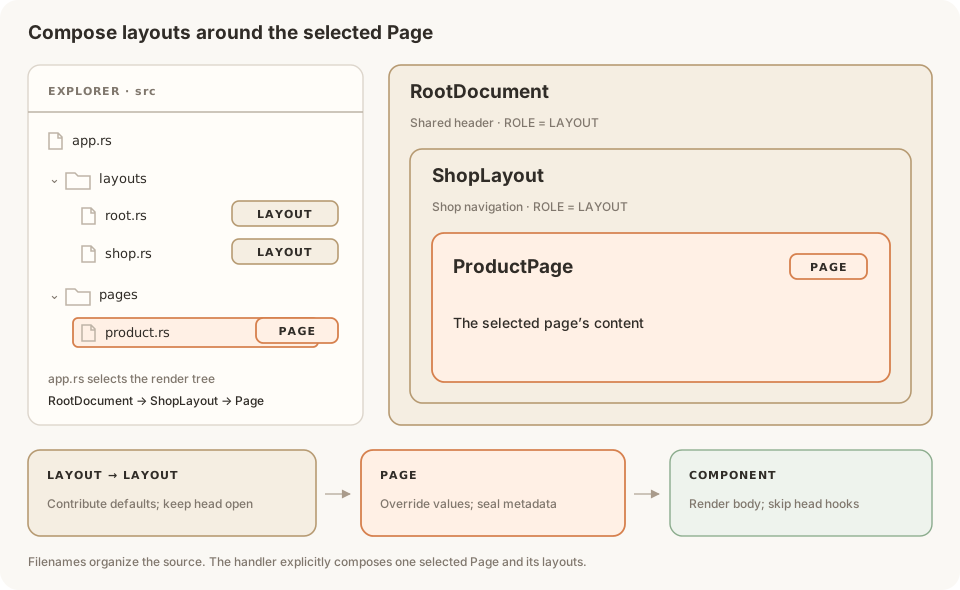 Source files and two nested LAYOUT components around one selected PAGE.
The router selects a handler. The handler composes the layout and Page. Rust filenames organize the code; URLs are registered explicitly. See Routing for route patterns and request parameters.
Create a Page
Declare PAGE even when a Page inherits all of its metadata. This example accepts its content through props and uses the same title in the head and body:
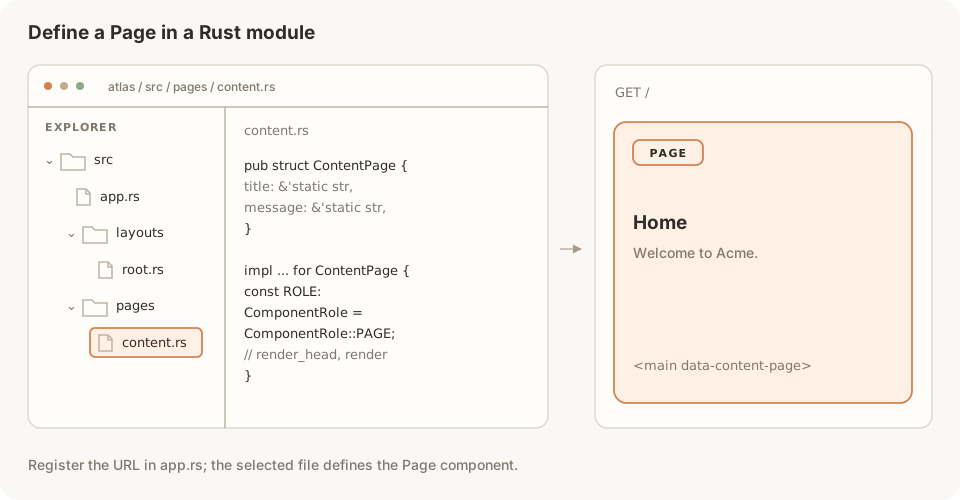 A Rust Page component is selected by a registered route and renders the page's main content.
use proa::{
    ComponentRole, DataLoader, SyncHeadOperation, WebContext, WebRenderSync,
    WriteError,
};
use proa::html_sync;

pub struct ContentPage {
    pub title: &'static str,
    pub message: &'static str,
}

impl<L: DataLoader> WebRenderSync<L> for ContentPage {
    const ROLE: ComponentRole = ComponentRole::PAGE;

    fn render_head(&self, cx: &mut WebContext<L>) -> impl SyncHeadOperation {
        cx.head_mut().title(self.title)
    }

    fn render(self, cx: &mut WebContext<L>) -> Result<(), WriteError> {
        html_sync! {
            <main data-content-page>
                <h1>{self.title}</h1>
                <p>{self.message}</p>
            </main>
        }
        .render(cx)
    }
}
The Page renders inside a managed document, configured below. Its render_head completes before its render body starts. A Page with no hook still declares PAGE and seals inherited metadata.
These first examples use WebRenderSync and html_sync! because they do not await data. Async Pages and layouts use the same roles.
Create a root layout
A root layout owns the document's <html>, <head>, and <body>. Put {cx.head()} at the position where generated metadata belongs, then render the child through the template.
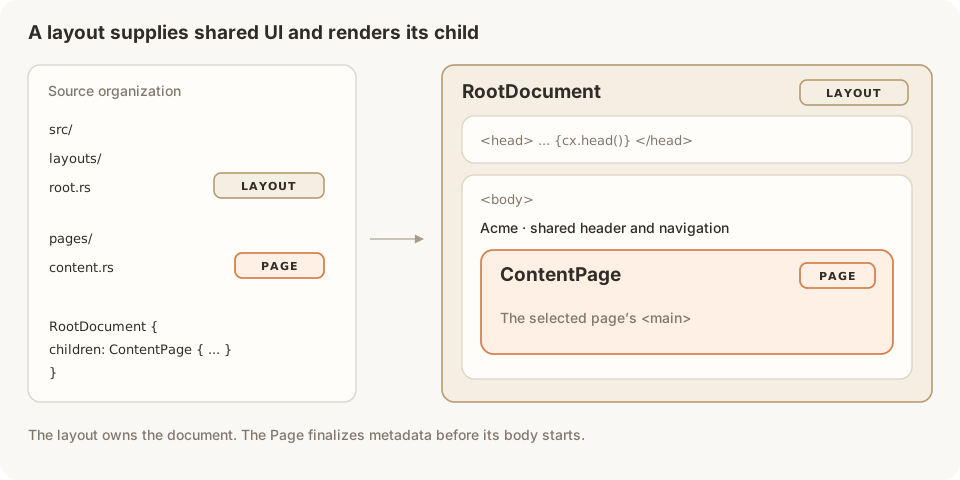 RootDocument declares LAYOUT, owns the document and head outlet, and wraps a ContentPage declaring PAGE.
use proa::{
    ComponentRole, DataLoader, SyncHeadOperation, WebContext, WebRenderSync,
    WriteError,
};
use proa::html_sync;

pub struct RootDocument<C> {
    pub children: C,
}

impl<L, C> WebRenderSync<L> for RootDocument<C>
where
    L: DataLoader,
    C: WebRenderSync<L>,
{
    const ROLE: ComponentRole = ComponentRole::LAYOUT;

    fn render_head(&self, cx: &mut WebContext<L>) -> impl SyncHeadOperation {
        cx.head_mut().title("Acme")?;
        cx.head_mut().title_template("%s | Acme")?;
        cx.head_mut().description("News and products from Acme.")?;
        Ok(())
    }

    fn render(self, cx: &mut WebContext<L>) -> Result<(), WriteError> {
        html_sync! {
            <!DOCTYPE html>
            <html lang="en" data-root-document>
                <head>
                    <meta charset="utf-8" />
                    <meta name="viewport" content="width=device-width, initial-scale=1" />
                    {cx.head()}
                </head>
                <body>
                    <header>
                        <a href={cx.url("/")}>"Acme"</a>
                    </header>
                    {self.children}
                </body>
            </html>
        }
        .render(cx)
    }
}
The layout supplies a default title and description. Its title template applies to descendant titles. The selected Page can override the description or any other field it writes. Charset and viewport are manual tags in the template.
Use template composition for children. A raw self.children.render(cx) call invokes only the child's body and skips lifecycle dispatch.
Connect Pages to routes
Re-export the components from your pages and layouts modules. Each handler chooses the tree it renders. The same Page component can serve different routes with different props:
use axum::{routing::get, Router};
use proa::{HeadConfig, HeadUrlPolicy, WriteError};
use proa::axum::{FrameworkBuilder, RouteResponse};
use crate::{layouts::RootDocument, pages::ContentPage};

async fn home() -> RouteResponse {
    RouteResponse::ssr(RootDocument {
        children: ContentPage {
            title: "Home",
            message: "Welcome to Acme.",
        },
    })
}

async fn about() -> RouteResponse {
    RouteResponse::ssr(RootDocument {
        children: ContentPage {
            title: "About",
            message: "Meet the people behind Acme.",
        },
    })
}

pub fn app() -> Result<Router, WriteError> {
    let routes = Router::new()
        .route("/", get(home))
        .route("/about", get(about));
    let head = HeadConfig::default()
        .with_urls(HeadUrlPolicy::new("https://acme.example", "/")?);

    Ok(FrameworkBuilder::new()
        .with_head(head)
        .with_dynamic_routes(routes)
        .build())
}
Use your configured public origin in place of https://acme.example. FrameworkBuilder::with_head enables managed metadata for rendered routes.
A request to /about selects the about handler, composes RootDocument → ContentPage, and produces this head:
<meta charset="utf-8">
<meta name="viewport" content="width=device-width, initial-scale=1">
<title>About | Acme</title>
<meta name="description" content="News and products from Acme.">
There is one document, one head outlet, and one selected Page. Components declaring LAYOUT or PAGE require managed rendering, even without a head hook. They cannot render through a plain WebContext::new() or a .without_head() response.
Nest layouts
A layout can render another layout as its child. This shop layout adds shared navigation and supplies a nearer title template:
use proa::{
    ComponentRole, DataLoader, SyncHeadOperation, WebContext, WebRenderSync,
    WriteError,
};
use proa::html_sync;

pub struct ShopLayout<C> {
    pub children: C,
}

impl<L, C> WebRenderSync<L> for ShopLayout<C>
where
    L: DataLoader,
    C: WebRenderSync<L>,
{
    const ROLE: ComponentRole = ComponentRole::LAYOUT;

    fn render_head(&self, cx: &mut WebContext<L>) -> impl SyncHeadOperation {
        cx.head_mut().title_template("%s | Shop")?;
        cx.head_mut().description("Explore the Acme shop.")?;
        Ok(())
    }

    fn render(self, cx: &mut WebContext<L>) -> Result<(), WriteError> {
        html_sync! {
            <section data-shop-layout>
                <nav aria-label="Shop">
                    <a href={cx.url("/shop")}>"Products"</a>
                </nav>
                {self.children}
            </section>
        }
        .render(cx)
    }
}
Compose the nesting in a handler. Re-export ShopLayout from your layouts module first:
use crate::layouts::ShopLayout;

async fn shop() -> RouteResponse {
    RouteResponse::ssr(RootDocument {
        children: ShopLayout {
            children: ContentPage {
                title: "Products",
                message: "Find your next everyday essential.",
            },
        },
    })
}
Register it with .route("/shop", get(shop)). The explicitly composed tree is RootDocument → ShopLayout → ContentPage:
<title>Products | Shop</title>
<meta name="description" content="Explore the Acme shop.">
The nearest ancestor template applies once: the title uses Shop. The Page seals metadata after its hook; the layouts remain ancestors around its body. Ordinary cards, buttons, and islands inside the Page keep the default COMPONENT role.
These examples render the composed tree on each server request. Keep interactive behavior in RSJS islands inside the selected Page.
Async Pages and layouts
When a head or body needs to await data, implement WebRender<L> and use html! for asynchronous child composition. An async head hook returns Result directly:
const ROLE: ComponentRole = ComponentRole::PAGE;

async fn render_head(&self, cx: &mut WebContext<L>) -> Result<(), WriteError> {
    let key = LoadKey::named(
        "product",
        cx.param("id").ok_or_else(|| WriteError::render("missing product id"))?,
    );
    let product = cx.load_typed::<Product>(key).await?;
    cx.head_mut().title(product.name.clone())?;
    Ok(())
}
Use a WebRender layout around an async Page, keeping ROLE = LAYOUT on that implementation. A sync-only child inside an async tree uses to_async(child). A synchronous Page uses RouteResponse::ssr; an async-capable tree uses ssr_async or ssr_stream.
The metadata guide covers async document templates, request-scoped loader reuse, and social images. Routing shows how the route above supplies cx.param("id").
Roles are explicit
Declaring PAGE or LAYOUT controls metadata lifecycle; it does not register a URL or wrap another component automatically. A Page still needs PAGE when it has no head hook. A layout above it uses LAYOUT. There must be exactly one selected Page in each managed document.
These rules apply equally to sync, async, Send, to_async, and to_send rendering. A LAYOUT must be above the selected Page; it is rejected after metadata seals or inside Suspense, captures, and fallbacks, even when its hook is the default no-op. A visual wrapper used inside a Page or in a manual document keeps the default COMPONENT role.
Run cargo proa lint <changed-paths> --deny warnings to catch head overrides with missing roles or an explicit COMPONENT role. Native async hooks rely on this source check; synchronous hooks also retain a code-generation role assertion, so build those implementations too.
Proa also has a route-metadata Layout trait and Route::layout constructor. They describe metadata in a route specification; they do not compose the rendered HTML or replace these component roles. Route specifications explains when to use them.
Next steps
- Routing: URL patterns, nesting, and request parameters.
- Metadata and OG images: head mutations and generated HTML.
- HTML rendering: synchronous and async composition.
- Linking and navigating: public URLs and mount prefixes.