Docs
Routing
Register an Axum route, render a Page, and read request parameters through cx.
Register a route
Start with an Axum Router. This route sends /shop/products/42 to the product handler:
use axum::{routing::get, Router};

let routes = Router::new()
    .route("/shop/products/:id", get(product));
The handler composes the document, shared shop layout, and selected Page:
use proa::axum::RouteResponse;
use crate::{layouts::{RootDocument, ShopLayout}, pages::ProductPage};

async fn product() -> RouteResponse {
    RouteResponse::ssr(RootDocument {
        children: ShopLayout {
            children: ProductPage,
        },
    })
}
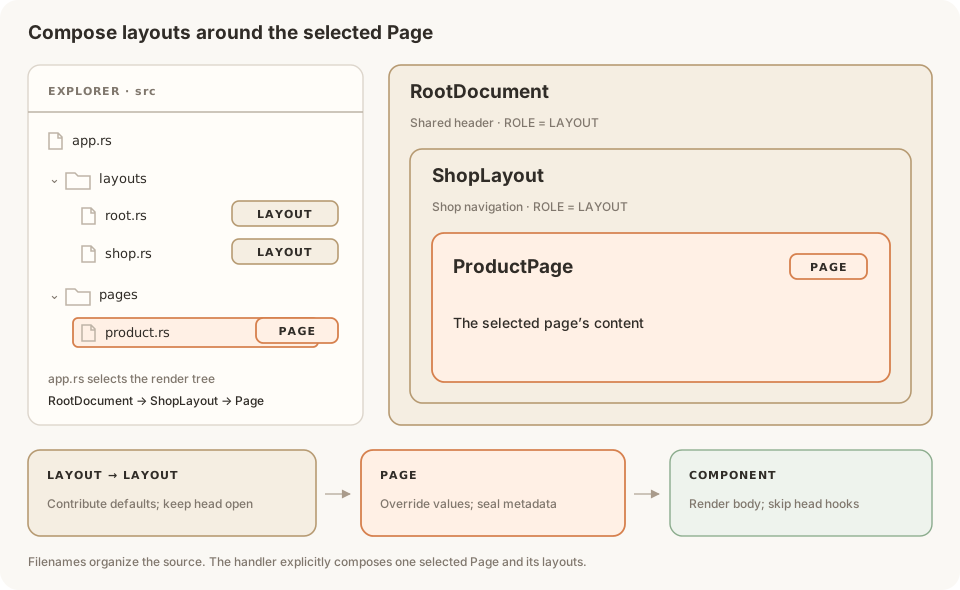 The file tree and explicitly composed layouts lead to one selected Page.
RootDocument and ShopLayout declare const ROLE: ComponentRole = ComponentRole::LAYOUT; ProductPage declares PAGE. See Layouts and Pages for their full implementations and document markup.
Install the router
Pass the router to FrameworkBuilder. Enable managed metadata with with_head:
use proa::{HeadConfig, HeadUrlPolicy};
use proa::axum::FrameworkBuilder;

let head = HeadConfig::default()
    .with_urls(HeadUrlPolicy::new("https://acme.example", "/")?);

let app = FrameworkBuilder::new()
    .with_head(head)
    .with_dynamic_routes(routes)
    .build();
Use your configured public origin in place of https://acme.example. The framework makes Axum's matched path parameters available through cx before head and body rendering.
Read route parameters from cx
A segment beginning with : captures a path value:
| Route | Request | Read through cx |
|---|---|---|
/shop/products/:id | /shop/products/42 | cx.param("id") → Some("42") |
/blog/:slug | /blog/red-shoes | cx.param("slug") → Some("red-shoes") |
These are URL patterns, registered explicitly; Rust filenames organize the source code.
Here is the ProductPage used above. It reads the same id in its head and body:
use proa::{
    ComponentRole, DataLoader, SyncHeadOperation, WebContext, WebRenderSync,
    WriteError,
};
use proa::html_sync;

pub struct ProductPage;

impl<L: DataLoader> WebRenderSync<L> for ProductPage {
    const ROLE: ComponentRole = ComponentRole::PAGE;

    fn render_head(&self, cx: &mut WebContext<L>) -> impl SyncHeadOperation {
        let id = cx.param("id")
            .ok_or_else(|| WriteError::render("missing product id"))?;
        let title = format!("Product {id}");
        cx.head_mut().title(title)
    }

    fn render(self, cx: &mut WebContext<L>) -> Result<(), WriteError> {
        let params = cx.route_params().cloned().unwrap_or_default();
        let id = params.get("id")
            .ok_or_else(|| WriteError::render("missing product id"))?;

        html_sync! {
            <main data-product-page>
                <h1>"Product "{id}</h1>
            </main>
        }
        .render(cx)
    }
}
cx.param(name) returns Option<&str>. cx.route_params() exposes the shared collection. Clone that handle before rendering when the template needs to borrow a parameter while writing through cx; this does not copy parameter strings.
For /shop/products/42, ShopLayout's title_template("%s | Shop") formats the Page's dynamic title:
<title>Product 42 | Shop</title>
<main data-product-page><h1>Product 42</h1></main>
The title goes in the document head and <main> in its body. Title templates work the same for :id and :slug: the Page supplies its title, often from a loader, and the nearest ancestor template formats it. A slug is not automatically turned into a display title. See Load metadata from data for an async example.
Query strings
Path captures and query strings are separate:
let path = cx.request_location().map(|location| location.path());
let query = cx.request_location().and_then(|location| location.query());
For /shop/products/42?currency=usd, these return Some("/shop/products/42") and Some("currency=usd"). query() returns the raw query string. Use a query parser or Axum's typed Query extractor for decoded fields.
Add and nest routes
Chain .route(...) calls to add Pages. Use Axum's .nest(...) to share a URL prefix:
let shop = Router::new()
    .route("/", get(shop_index))
    .route("/products/:id", get(product));

let routes = Router::new()
    .route("/about", get(about))
    .nest("/shop", shop);
This registers /about, /shop, and /shop/products/:id; Axum maps the nested / route to the prefix itself. Each handler explicitly composes its layout and Page. URL nesting does not add HTML wrappers.
Route specifications
Use Proa's Route::endpoint when you also need route modes, static-path declarations, or route-specification metadata. It produces an Axum router you can merge with the rest of the app:
use proa::axum::{Route, RouteMode};

let routes = Router::new().merge(
    Route::endpoint("/shop/products/:id", get(product))
        .with_route_mode(RouteMode::Server)
        .into_router(),
);
Server, Static, and ClientBrowser describe routes to tooling; they do not set component roles or compose layouts. The older Route::layout and Route::page APIs describe route metadata independently of render_head. See metadata migration when updating those documents.
Next steps
- Layouts and Pages: document markup, component roles, and nesting.
- Metadata and OG images: dynamic titles, defaults, and social images.
- Route handlers: JSON, forms, and non-page endpoints.
- Linking and navigating: public URLs and mount prefixes.